Optimize your LinkedIn profile
Among the plethora of features on LinkedIn, there are some that get overlooked by users, even though their proper application can significantly boost online visibility and lead to better career opportunities. Don’t forget about this crucial step of preparing your profile – optimization. Below we share the most important tips on how to optimize your LinkedIn profile and utilize its potential to the fullest!
Skills
Research target job ads in terms of the required skills and strategically add them to your profile on LinkedIn. Ideally, get a group of friends / colleagues to endorse each other’s top skills.
Note: This feature is currently being improved, undergoing many changes. Access to this information varies by job posting and account type.

There are two categories of skills in job ads:
- skills added by the job poster (available to both Premium and regular accounts)
-
skills associated with the job ad (available only to regular accounts – this is probably a bug)


- Check the list of skills that match your profile (see above #1).
- Add relevant skills to your profile.
Keywords
There are two types of keywords when considering LinkedIn job ads:
- “Public” keywords from the ad. These are the keywords from the ad description that is visible to everybody.
Tip: Find 5-10 job ads that you would like to apply to and create a list of common keywords to add to your profile. - Invisible keywords. Invisible keywords are set by the job ad publisher and are not visible. You’ll need to make an educated guess as to which keywords that could be. Having said that, they will most probably overlap with the keywords from the previous point.
Job Seeking Preferences
Go to: Settings & Privacy → Data privacy → Job seeking preferences
Fill out your job seeking preferences to ensure you are seen where and how you’d like to be seen.
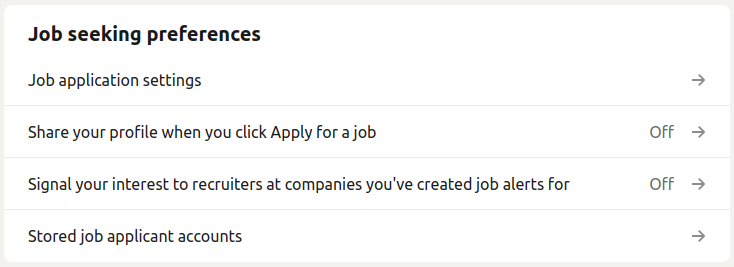
Adjust Your “Open To” Settings On Your Profile
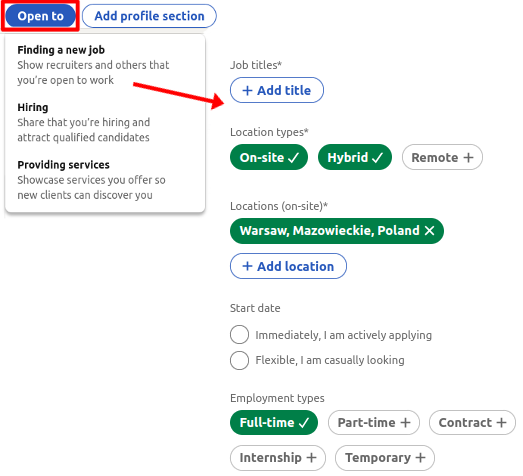
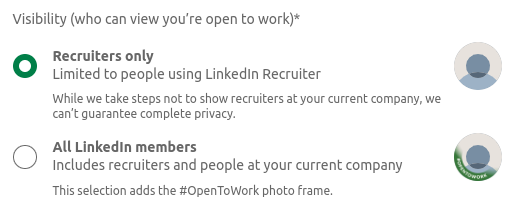
You can let recruiters know you are looking for a job with The “Open to” settings on your LinkedIn profile. Selecting “All LinkedIn members” will tag your profile picture with a green frame – although we don’t recommend doing that in most cases.
Search Results
Want to appear high in search results?
- Make sure your profile is complete, especially that it includes a photo.
- Make sure to add connections (min. 200, ideally 500+), but without SPAMming.
- Use relevant keywords in your headline and profile summary and across the entire profile.
Adding Connections
- Set your own rules of who you want to add and who you do not want to add. Stick to it.
- The elegant & professional solution is to prepare message templates to use when sending a connection request and personalize them on a case-by-case basis.
- Exception: adding somebody you have just interacted with, as that already gives a good context.
Events
- It’s a good way to increase your network by reaching out to fellow participants!
Don’t forget about the fundamentals of effective online presence! Now that you know all the more obscure elements of creating a LinkedIn profile, make sure you have the basics accounted for as well!
If you have any questions regarding how to optimize your LinkedIn profile, don’t hesitate to contact us!
- Send an e-mail directly to Contact@CareerAngels.eu and schedule a free Career Consultation with one of your experts | Subject: Free Career Consultation