If You’re Not Getting Contacted on LinkedIn, Then It’s Time to Optimize Your Profile
LinkedIn is the world’s largest professional network with over 1.2 billion members. Yet, many professionals remain invisible. Why? Because they stop at the basics: upload a photo, list a few roles, write a short summary, and then wonder why nothing happens.
The truth is: recruiters and decision makers rely on keywords, skills and filters when they search for candidates. If your profile isn’t optimized, you won’t even appear in their results. That means missed interviews, fewer opportunities and slower career progress.
And it’s not only about being found. A poorly structured profile can also hurt your credibility. Even if someone does land on your page, they may not recognize you as the expert you truly are.
The good news? The essentials (photo, headline, summary, experience) are just the starting point. With a few smart adjustments, you can fine-tune your profile for maximum visibility and make LinkedIn work harder for you.
How to Optimize Your LinkedIn Profile for Maximum Visibility
Skills
Research target job ads to see which skills are required, then add the relevant ones to your LinkedIn profile. Ask a few trusted friends or colleagues to endorse your top skills.
Heads-up: LinkedIn is actively updating how skills show up in job ads. Visibility can vary by job posting and account type.

You may see two skill sources in job ads:
- Skills added by the job poster, visible to both Premium and free accounts.
- Skills associated with the job ad, sometimes visible (surprisingly) only to free accounts.


What to do:
- Review the list of skills that match your profile.
- Add the relevant ones to your profile and seek endorsements.
Keywords
There are two kinds of keywords in LinkedIn job ads:
1. Public keywords: visible to everyone in the job ad description.
Tip: collect 5-10 job ads that you would like to apply to and create a list of common keywords to add to your profile.
2. Recruiter-added keywords: entered by the job poster in the must-have and preferred qualifications fields. These may not always appear in the visible description, but they feed LinkedIn’s matching system. In most cases, they will overlap with the public keywords from the previous point.
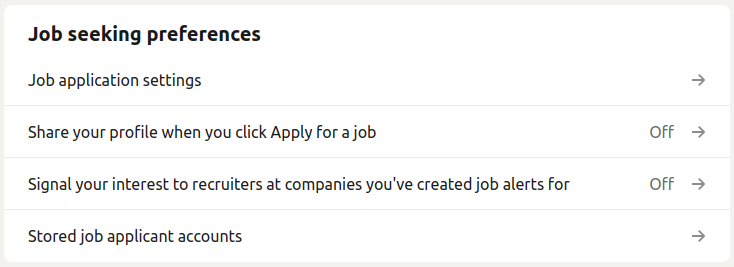
Job Seeking Preferences
Go to: Settings & Privacy → Data privacy → Job seeking preferences.
Fill this out to ensure you are seen where and how you’d like to be seen.
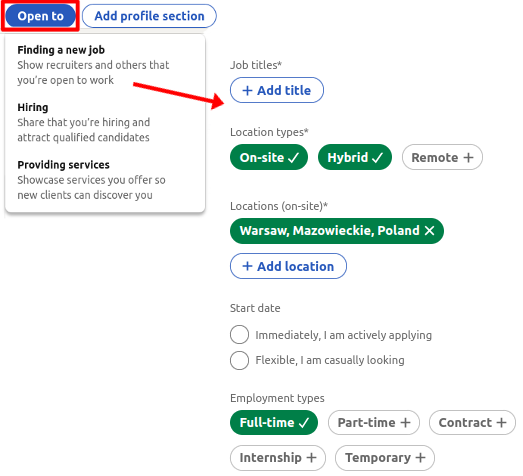
Adjust Your “Open To” Settings On Your Profile
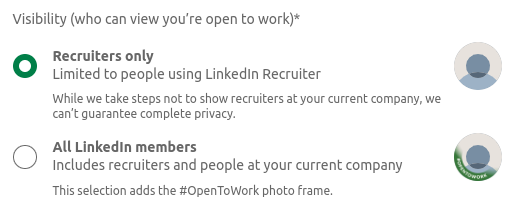
Use the “Open to” button on your profile to signal you’re open to work. Choosing “All LinkedIn members” adds a green photo frame – in most cases we don’t recommend that. Prefer sharing your status with Recruiters only.
Search Results
Want to rank higher?
- Make sure your profile is complete, especially that it includes a photo.
- Make sure to add connections (min. 200, ideally 500+), but without spamming.
- Use relevant keywords in your headline and profile summary and across the entire profile.
Adding Connections
- Decide who you add and who you don’t – then stick to your rules.
- The most elegant and professional approach is to draft a few connection-request templates and personalize each one before you send it.
- Exception: if you’ve just interacted with someone, a quick invite without a long message is fine.
Events
Events are a simple way to grow your network. Reach out to fellow participants and speakers with a short, context-rich message.
Why a Strong LinkedIn Profile Matters
A fully optimized profile gives you:
- higher visibility in recruiter searches,
- strengthened credibility as an expert,
- more opportunities: from jobs to board seats and partnerships,
- and control over how you are perceived.
Get Objective (And Free!) Feedback on Your Profile
In the past 5 years only, 4,396 senior managers and executives have asked us for help with their careers, including their LinkedIn profiles. More than 80% recommend our services, and many start receiving recruiter outreach within weeks of optimizing their profiles.
You can do the same. Request a free LinkedIn Report and get an objective, section-by-section review of your profile with concrete, prioritized fixes. It’s confidential and delivered within 3-5 business days.
To request yours, email Contact@CareerAngels.eu with the subject LinkedIn Report / Blog and include your LinkedIn URL. We’ll reply with feedback that’s practical, precise and tailored to your goals.
Even one incomplete field is a lost signal to the market. Take two minutes now and turn your profile into a sharper, more findable asset.