How to create a solid LinkedIn profile – step by step
LinkedIn has over 1.2 billion members worldwide and remains recruiters’ primary sourcing tool. But here’s the problem: based on our experience, many executive profiles are still incomplete or not fully optimized. That means even highly qualified executives and managers may be invisible to headhunters and decision makers.
If your headline is vague, your profile summary is too generic, or your photo is less than professional, you may be disqualifying yourself before you even enter the race. Every incomplete field is a missed opportunity.
So how do you fix that? By building your LinkedIn presence strategically, field by field.
Start With a Plan
First, define your goal. Ask yourself: Why am I on LinkedIn? Who do I want to reach? A headhunter looks for something very different than a potential employer, client or investor. You may want to position yourself as a (future) employer, (potential) employee, business partner, service provider or industry expert. But here’s an important rule: limit yourself to two roles at most to avoid diluting your message.
And always remember: you’re writing for two audiences simultaneously: humans (recruiters, decision makers, hiring managers) and the LinkedIn algorithm (keywords and skills).
Only then should you start writing. Work offline at first: draft your profile content in a document file, then proofread and triple-check it. Once you’re satisfied, upload it.
Field by Field: How to Get It Right
Let’s go step by step through the key LinkedIn sections.
Name
Use your first and last name in the right order (this mistake happens more often than you’d think!).
If you have a very common name, consider adding a middle name or an initial. For example, Sandra Bichl might turn into Sandra M. Bichl. For consistency purposes, start using it also in your email signature, etc.
Avoid academic titles (MBA, PhD) in this field, unless you’re in Germany, Austria or in an industry where it’s truly relevant.
Contact Info
Make sure to set a “primary email address” that is adequate for your target audience (this could be your business email or a private one – just remember it should look professional). “Primary” means it’s the only one visible. In addition, add a link to your current company’s website.
Headline
This is the line BELOW your name and one of the first things visible in search results. It can be edited separately. Don’t waste it with “Looking for new opportunities”. Instead, use it to position yourself clearly and attractively for your audience.
Industry
You would be surprised how many people make mistakes in this section. Make sure you choose the correct one, and remember that your position doesn’t equal the industry you work in!
For instance, if you are a CFO who works in a company that produces and sells snacks, you should set FMCG, not Finance. If you’re targeting a new sector, select that one. If you can work across several industries, choose the industry you prioritize.
Profile Link
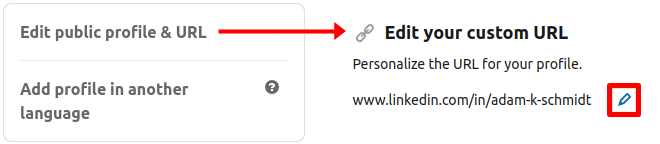
Personalize it by creating a link that can be included in your signature or application documents (click on the “Edit” button next to the link):
- Good link: https://pl.linkedin.com/in/sandrabichl
- Bad link: https://pl.linkedin.com/in/sandrabichl/012394/mink/0234 (by default)
Photo
Your profile picture should look professional and authentic, while still feeling natural and approachable. It should invite people to connect with you, unless, of course, you want to intentionally project a colder or more distant image. Choose an outfit that reflects how someone from your target group would realistically see you when meeting for the first time in a professional context.
The photo itself should have a neutral background and even lighting. A classic head-and-shoulders shot works best. Dress as you would for an important interview, look directly into the camera, and keep your pose relaxed and natural.
Background Image
Your background image should align with the impression you want to create. A safe option is to keep it neutral or single-color, making sure it’s consistent with the overall professional image you are building.
Be cautious with decorative photos, like landscapes: they often distract from your profile rather than support it. The only real exception is when a specific background is required by corporate policy.
Connections
When it comes to connections, the right number depends on your seniority. If you are a CEO or Board Member, aim for at least 500. If you are a manager with more than 10 years of experience, 200 should be your minimum.
By default, your list of connections is visible to your 1st-degree contacts, but you can easily adjust this in your LinkedIn settings under Settings & Privacy → Visibility → Connections → Off.
Profile Summary
Your profile summary should highlight what makes you unique = your personal Unique Selling Proposition. Think of it as the essence of who you are, written with your target audience in mind. The best approach is to first make it engaging for a human reader and then optimize it with keywords for LinkedIn’s algorithm.
A simple way to check if your summary works is to ask yourself: if another professional with a similar role could copy it with just a few small tweaks, then it’s not strong enough. If it truly reflects you, it’s on the right track.
Experience
Do NOT simply copy and paste your CV. Highlight only the last 7-10 years of experience (up to 15 if it strategically makes sense) and avoid sharing sensitive or confidential information.
Describe roles consistently: use the same format and length each time, for example, 3 concise bullet points per entry.
Make sure your profile is balanced: do not provide too much or too little information. If you leave too many questions unanswered recruiters may simply move on rather than take the time to request your CV; At the same time, don’t overload your profile with every detail → you want to spark interest and encourage recruiters to reach out for more. Sensitive or delicate points that could raise doubts should be addressed directly and clearly.
Languages
List only the languages you can confidently work in, and remember to include your native language.
Groups
Join groups that reinforce your expertise and hide (but don’t delete) those that aren’t relevant. Keep in mind you can message other group members directly (no need to purchase InMail!).
Other Sections
- Projects: Share interim assignments and relevant case studies you’re allowed to disclose.
- Honors & Awards: List recent, relevant items, ideally from the last 5-7 years. Include older ones only if they’re truly noteworthy.
- Organizations: Add meaningful memberships, including board roles.
- Education: Include higher education and key trainings. Skip high school. Consider hiding this section if it could reveal your age to your disadvantage.
- Publications: Add your articles, books, and media mentions.
- Recommendations: Either skip them or do them properly. Make sure they are honest, relevant, and specific. Ask managers, colleagues, or clients who can credibly highlight your strengths and impact. Quality outweighs quantity – and headhunters do verify them!
Go Online
Once your profile is drafted, proofread it carefully and triple-check grammar, punctuation and spelling. Then ask 3-4 people from your target audience whether the content speaks to them and adjust based on their feedback. Finally, once you are satisfied with the final version, upload it to LinkedIn section by section and review how it looks on desktop and mobile.
How to Optimize Your LinkedIn Profile for Maximum Visibility
Skills
Research target job ads to see which skills are required, then add the relevant ones to your LinkedIn profile. Ask a few trusted friends or colleagues to endorse your top skills.
Heads-up: LinkedIn is actively updating how skills show up in job ads. Visibility can vary by job posting and account type.

You may see two skill sources in job ads:
- Skills added by the job poster, visible to both Premium and free accounts.
- Skills associated with the job ad, sometimes visible (surprisingly) only to free accounts.


What to do:
- Review the list of skills that match your profile.
- Add the relevant ones to your profile and seek endorsements.
Keywords
There are two kinds of keywords in LinkedIn job ads:
1. Public keywords: visible to everyone in the job ad description.
Tip: collect 5-10 job ads that you would like to apply to and create a list of common keywords to add to your profile.
2. Recruiter-added keywords: entered by the job poster in the must-have and preferred qualifications fields. These may not always appear in the visible description, but they feed LinkedIn’s matching system. In most cases, they will overlap with the public keywords from the previous point.
Job Seeking Preferences
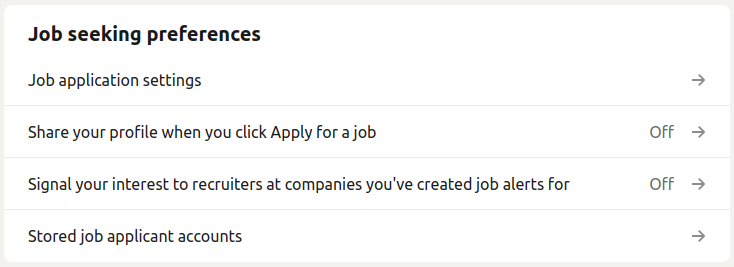
Go to: Settings & Privacy → Data privacy → Job seeking preferences.
Fill this out to ensure you are seen where and how you’d like to be seen.
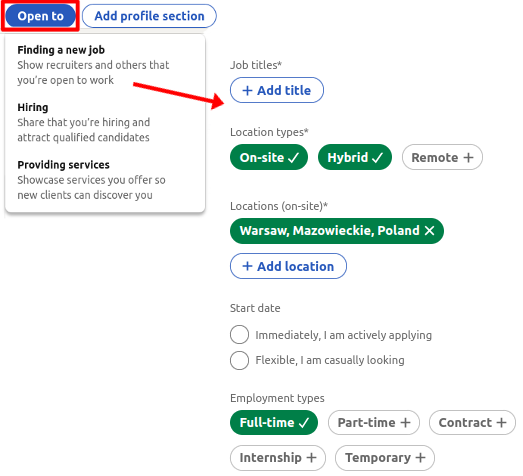
Adjust Your “Open To” Settings On Your Profile
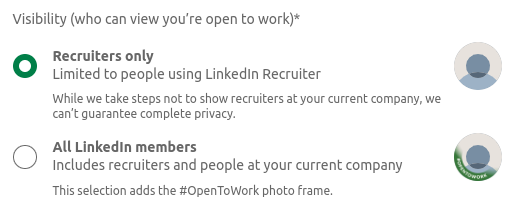
Use the “Open to” button on your profile to signal you’re open to work. Choosing “All LinkedIn members” adds a green photo frame – in most cases we don’t recommend that. Prefer sharing your status with Recruiters only.
Search Results
Want to rank higher?
- Make sure your profile is complete, especially that it includes a photo.
- Make sure to add connections (min. 200, ideally 500+), but without spamming.
- Use relevant keywords in your headline and profile summary and across the entire profile.
Adding Connections
- Decide who you add and who you don’t – then stick to your rules.
- The most elegant and professional approach is to draft a few connection-request templates and personalize each one before you send it.
- Exception: if you’ve just interacted with someone, a quick invite without a long message is fine.
Events
Events are a simple way to grow your network. Reach out to fellow participants and speakers with a short, context-rich message.
Why a Strong LinkedIn Profile Matters
A well-built, fully optimized profile gives you:
- higher visibility in recruiter searches,
- strengthened credibility as an expert,
- more opportunities: from jobs to board seats and partnerships,
- and control over how you are perceived.
Get Objective (And Free!) Feedback on Your Profile
If you recognized yourself in any of these LinkedIn mistakes – a vague headline, a generic summary, incomplete fields – fixing them now can change how recruiters and decision makers find you. In the past 5 years only, 4,357 senior managers and executives have asked us for help with LinkedIn and career strategy. Over 80% recommend us, and many report recruiter outreach within weeks after optimizing their profiles.
We offer a free LinkedIn Report for exactly this reason. You’ll get an objective, section-by-section review with concrete, prioritized fixes. It’s confidential and delivered within 3-5 business days.
To request yours, email Contact@CareerAngels.eu with the subject LinkedIn Report / Blog and include your LinkedIn URL. We’ll reply with feedback that’s practical, precise and tailored to your goals.
Even one incomplete field is a lost signal to the market. Take two minutes now and turn your profile into a sharper, more findable asset.